Can’t find the answer you’re looking for? Contact us—we’ll be happy to help and answer your questions about Smart Safe.
Master password
Forgot master password
For maximum security, the app’s master password is not stored anywhere, neither on the device nor on the server. Not even the developer can recover it.
Warning! If you have forgotten your password, do not uninstall the app before following these steps.
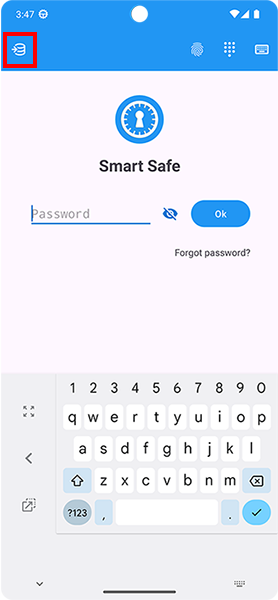
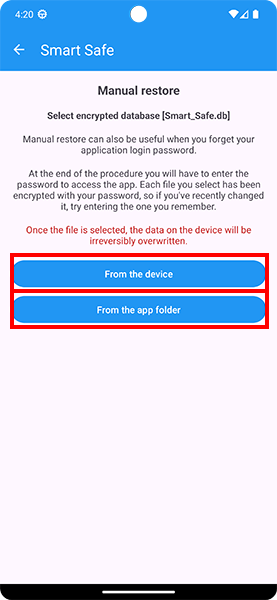
Mode 1 – Previous backup 1) From the app home screen, tap the “database” icon, import an encrypted backup, and try logging in with an old password. 2) Each database backup is encrypted with your password. If you remember an old password, try importing the backup file and logging in with the old password. Some recently entered data may be missing and you may need to save it again. Mode 2 – Fingerprint If you enabled biometric login, sign in and change your password from: Settings → Security → Change master password
How to avoid losing access
Enable automatic database backup.
Keep at least one manual backup somewhere outside the app.
Enable fingerprint login.
Backup and Restore
Automatic internal backup
Enable it in Settings → Backup → Automatic backup to keep copies of the encrypted database.
Note: automatic backups are stored in the app folder. If you uninstall the app, those files are removed.
Automatic external backup (RECOMMENDED)
Important: automatic backups are managed directly by the Android operating system. Make sure they are enabled by following the guide available HERE.
Manual backup
From Settings → Backup → Manual backup, save the file to an external location. If you uninstall the app, the manual backup file remains on your device.
Sending manual backup
After creating the manual backup (encrypted Smart_Safe.db file), you can send it to your email as an additional safety copy. That file can only be opened with Smart Safe and only with your password. It cannot be opened with third-party apps.
Manual restore
Go to Settings → Restore → Restore database and select an encrypted Smart_Safe.db file.
Automatic restore (RECOMMENDED)
If you had enabled external automatic backup, when you reinstall Smart Safe on a device and set up your Gmail account in Google Play, all your data will be restored automatically. You will still need to enter your master password to sign in.
Data security
Encryption
All your data is protected with 256-bit AES encryption using your master password, the security standard also used by governments and banks.
Data synchronization
What is synchronization?
Synchronization keeps your Smart Safe data updated across multiple Android devices and the Smart Safe web version. When you add, edit, delete, or restore an item, the changes are synchronized with your personal cloud space and made available on the other devices connected to the same account.
Your data remains protected by your master password: Smart Safe synchronizes the encrypted database and does not store your master password on its servers.
How do I enable and use it?
To use synchronization, open the Android app and go to Settings → Data synchronization. Sign in with your Google account and enable synchronization.
After activation, Smart Safe automatically synchronizes your data when you open the app, when you make changes, and when you start synchronization manually. For correct operation, make sure the Internet connection is active and the same Google account selected for synchronization is available on the device.
How do I access from another device?
Install Smart Safe on the new device, sign in with the same Google account used for synchronization, and enter your master password. After the first sign-in, Smart Safe downloads and synchronizes the data available in the cloud.
The same master password is required to open the database on the other devices too. If the master password is not correct, the data cannot be decrypted.
Is data synchronized with the Web App too?
Yes. After enabling synchronization from the Android app, you can also access your data from the Smart Safe web version. Changes made from the Android app and from the Web App are synchronized with each other, so you can use Smart Safe from your phone, other Android devices, and your computer.
To access the Web App, use the same Google account linked to synchronization and enter your master password when requested.
Troubleshooting synchronization issues
If synchronization does not work, check your Internet connection, make sure the Google account is still available on the device, and try disabling and re-enabling synchronization from the app settings.
Smart Safe Web App
How does it work?
Access your data from a computer through the web application. To use it, you must be a PREMIUM user (subscription or lifetime license) and enable data synchronization in the Android app settings. The Smart Safe web version uses the same synchronization as the app: sign in with the same Google account, enter your master password, and find your data synchronized between Android and the Web App. Web App link.
How to access
Open the Smart Safe web version, sign in with the same Google account used for synchronization in the Android app, and enter your master password. After sign-in, your synchronized data will also be available from your computer.
Smart Safe browser extension
What is the browser extension for?
The Smart Safe extension for Google Chrome, Microsoft Edge and Mozilla Firefox is a read-only companion to the password manager. It finds credentials associated with the website currently open and lets you fill the username and password fields or copy them, always after an explicit action by you.
The extension cannot create, edit or delete vault items, and it never submits login forms automatically.
In Chrome, select Add to Chrome. In Edge, if prompted, first select Allow extensions from other stores, then select Get or Add extension and confirm the installation.
For quicker access, open your browser’s extensions menu and pin Smart Safe to the toolbar.
In the Smart Safe Android app, make sure data synchronization is enabled. The extension must use the same Google account selected for synchronization.
Extension usage guide
Open the website’s login page and select the Smart Safe icon in the Chrome, Edge or Firefox toolbar.
Enter your Smart Safe master password (the database password), then select Connect Google and sync.
Choose the same Google account used by Smart Safe synchronization and grant the requested access.
The extension downloads the newest encrypted database from Google Drive and shows the accounts associated with the current site. You can also search by title, username or website.
Select Autofill to fill the visible login fields, or copy the username and password separately. On two-step login pages, fill the username, continue to the password screen, then reopen Smart Safe to fill the password.
Use Update to download the latest database again, or the power button to lock Smart Safe immediately.
How are my credentials protected?
The database is downloaded from Google Drive when the extension opens. The database password and decrypted credentials remain only in temporary browser storage and are deleted when Smart Safe locks or the browser closes.
Automatic locking can be set to 5, 10, 15, 30 or 60 minutes from the extension settings. You can also lock it manually at any time.
PREMIUM Version
Subscription and lifetime license
Smart Safe lets you use all PREMIUM features for 7 days; then you can subscribe or purchase a lifetime license. If you do not become a PREMIUM user, access to your data remains free, but with several important limitations.
Restore purchase
Use Restore purchase and enter the email address you used for the payment. Make sure the same Gmail account is active on the device.
Cancel subscription
To cancel a subscription, click the link below. It will take you to the Google Play subscriptions section. Google Play link.